insynout

  • Subscribe to our RSS feed.
  • Twitter
  • StumbleUpon
  • Reddit
  • Facebook
  • Digg
Showing posts with label How To. Show all posts

Tuesday, 7 February 2017

Top 10 Websites you never knew to Download Movies Legally For Free !!

Posted on February 07, 2017 by anuj
download movies,movies 2016,youtube movies,full hd movies download,utorrent movies,utorrent movies download,movie download, download hindi movies free,the internet archive,feature films, retrovision, classic movies, paramount movies, paramount vault,crackle,open culture,movies found online,full movies, popcornflix, classic cinema online, classic televission online,hulu tv streaming, torrents, public domain torrents, charlie chaplin, creepy classics

Everyone loves to watch movies and even loves them more if they are free to watch. If you Google "free movies" lots of them appear for download but in most cases, you end up downloading a virus or malware. Moreover, these sites are illegal for downloading and are deleted by google to make web search safe and free of malware.

Another source of downloading movies are through torrent websites. Downloading through these websites often get users into trouble. With the streaming services like Netflix, Amazon, HBO etc., watching movies and TV shows in our home has become more comforting than ever. What if you don't want to spend money? Without any further ado, let's see the list of websites to download movies legally.


List of Top 10 Websites to download Movies for free :


1. The Internet Archive :

download movies,movies 2016,youtube movies,full hd movies download,utorrent movies,utorrent movies download,movie download, download hindi movies free,the internet archive,feature films, retrovision, classic movies, paramount movies, paramount vault,crackle,open culture,movies found online,full movies, popcornflix, classic cinema online, classic televission online,hulu tv streaming, torrents, public domain torrents, charlie chaplin, creepy classics

The Internet Archive houses collection of a ton of articles, texts, music, and movies. From Internet Archive, you can download hundreds of books and even movies for free.

About 4-5 years ago they provided direct links for downloads which used to break a lot as the file size was large. Now they are providing torrent links for easy downloads. My favorite on the website is Charlie Chaplin's original recordings.they are awesome.

2. Retrovision : 

download movies,movies 2016,youtube movies,full hd movies download,utorrent movies,utorrent movies download,movie download, download hindi movies free,the internet archive,feature films, retrovision, classic movies, paramount movies, paramount vault,crackle,open culture,movies found online,full movies, popcornflix, classic cinema online, classic televission online,hulu tv streaming, torrents, public domain torrents, charlie chaplin, creepy classics

Retrovision is a great source for downloading classic movies and TV shows which are in the public domain. The website is simple and easy to use. It has genre-specific menus which makes searching very easy. The website divides it's content to different popular categories like Adventure, Comedy, Crime, Cartoons, Sci-Fi, Horror, Drama and Westerns.

You can also sign up for their email subscription to get notified about any new content that's posted om the website.

3. YouTube :

download movies,movies 2016,youtube movies,full hd movies download,utorrent movies,utorrent movies download,movie download, download hindi movies free,the internet archive,feature films, retrovision, classic movies, paramount movies, paramount vault,crackle,open culture,movies found online,full movies, popcornflix, classic cinema online, classic televission online,hulu tv streaming, torrents, public domain torrents, charlie chaplin, creepy classics

You might be surprised by seeing YouTube in the list. It hosts numerous free-to-watch movies and has multiple channels that let you watch movies for free that are in public domain. There are some specific movies and movie shows that you can enjoy without paying a penny.

The Paramount Vault that features a long list of classic feature films, Public Domain Full Movies and PopcornFlix  are some of the popular channels.

4. Crackle 

download movies,movies 2016,youtube movies,full hd movies download,utorrent movies,utorrent movies download,movie download, download hindi movies free,the internet archive,feature films, retrovision, classic movies, paramount movies, paramount vault,crackle,open culture,movies found online,full movies, popcornflix, classic cinema online, classic televission online,hulu tv streaming, torrents, public domain torrents, charlie chaplin, creepy classics

Crackle is owned by Sony and is a great free movie download website. You get a lot of free movies to watch. All you need to do is a simple signup, create a watchlist and you'll be shown recommendations based on your liking.

Crackle offers a great range of popular movies and TV shows that you won't find on any other free service. Be sure to check out this great service.

5. Open Culture: 

download movies,movies 2016,youtube movies,full hd movies download,utorrent movies,utorrent movies download,movie download, download hindi movies free,the internet archive,feature films, retrovision, classic movies, paramount movies, paramount vault,crackle,open culture,movies found online,full movies, popcornflix, classic cinema online, classic televission online,hulu tv streaming, torrents, public domain torrents, charlie chaplin, creepy classics

Open Culture is a home to free movies, free Online Courses, and free Language lessons. It was founded in 2006 and has 6 main sections: Movies, Online Courses, Language lessons, Ebooks, Textbooks, and Audiobooks. Movies section consists of an excellent collection. Open Culture offers high-quality from all around the world.

It currently holds 1150 movies which include a special collection of Oscar Winning Movies and Charlie Chaplin Movies.


6. MoviesFoundOnline :

download movies,movies 2016,youtube movies,full hd movies download,utorrent movies,utorrent movies download,movie download, download hindi movies free,the internet archive,feature films, retrovision, classic movies, paramount movies, paramount vault,crackle,open culture,movies found online,full movies, popcornflix, classic cinema online, classic televission online,hulu tv streaming, torrents, public domain torrents, charlie chaplin, creepy classics

MoviesFoundOnline hosts free movies ranging from old Cult classics to new independent films. It is the best download website. They also feature Short Films, Documentaries, Stand-up comedy and series and shows. They also find free movies, short films, documentaries, animations, series and other videos online and list them on this site. Watch hand picked streaming videos online for free.

As MoviesFoundOnline doesn't host or upload any media on it's own, it works actively on deleting movies if there's any copyright infringement.

7. PopcornFlix : 

download movies,movies 2016,youtube movies,full hd movies download,utorrent movies,utorrent movies download,movie download, download hindi movies free,the internet archive,feature films, retrovision, classic movies, paramount movies, paramount vault,crackle,open culture,movies found online,full movies, popcornflix, classic cinema online, classic televission online,hulu tv streaming, torrents, public domain torrents, charlie chaplin, creepy classics

This free movie streaming website is owned by Screen Media Ventures. The website offers lots of public domain movies and original content. You can use this website to view content on any type of device without spending a single penny.

The website hosts thousands of free movies spread across multiple categories like drama, action, comedy, horror etc. Here, you’ll also get many free TV shows and full National Geographic series catalog.

8. Classic Cinema Online:

download movies,movies 2016,youtube movies,full hd movies download,utorrent movies,utorrent movies download,movie download, download hindi movies free,the internet archive,feature films, retrovision, classic movies, paramount movies, paramount vault,crackle,open culture,movies found online,full movies, popcornflix, classic cinema online, classic televission online,hulu tv streaming, torrents, public domain torrents, charlie chaplin, creepy classics

Fans of Classic cinema rejoice, as Classic Cinema Online is going to become your best friend. This movie website hosts many classic movies like Lone Ranger, Mobey Dick, Bye Bye Birdie and much more.

The website hosts categories such as Movie Billboards, Serials, Silent Films. Using itss helpful sorting and category feature one can enjoy movies seamlessly.

9. Hulu :

download movies,movies 2016,youtube movies,full hd movies download,utorrent movies,utorrent movies download,movie download, download hindi movies free,the internet archive,feature films, retrovision, classic movies, paramount movies, paramount vault,crackle,open culture,movies found online,full movies, popcornflix, classic cinema online, classic televission online,hulu tv streaming, torrents, public domain torrents, charlie chaplin, creepy classics

Hulu is one of the famous streaming website that is subscription-based. The website used to have a free account. But now it has an only trial, limited and no-ad plans. The free plan comes with a limited content which enables to stream more than 100 free movies. Apart from movies, the site also has lots of free TV shows for their subscribers.

10. Public Domain Torrents :

download movies,movies 2016,youtube movies,full hd movies download,utorrent movies,utorrent movies download,movie download, download hindi movies free,the internet archive,feature films, retrovision, classic movies, paramount movies, paramount vault,crackle,open culture,movies found online,full movies, popcornflix, classic cinema online, classic televission online,hulu tv streaming, torrents, public domain torrents, charlie chaplin, creepy classics

Public Domain Torrents is probably the only no-notorious-activity torrent website that I know about. This free movie download website is a home to a number of old and classic movies. Here, movies are available in multiple formats and you can download them according to your need.

Hope you like this article. Please share the article and for any related suggestion for new articles please comment down below.

Read More
Posted in How To, Tips | No comments

Monday, 23 January 2017

Secret: How to download large files from Google Drive the right way

Posted on January 23, 2017 by anuj
  How to download files above 2gb from google drive

Google Drive is an awesome tool for saving files online. It offers 15 GB storage for a standard free account. If you want more space, then upgrade to their premium plans which are cheaper and are at reasonable prices.

You can easily download files of less size...about 2GB from google drive using the Google Drive's desktop app and direct download, but beyond that, it will struggle to download files. I tried to download all my pics from my backup which were about 2.5 GB, compressed them and they were failing each and every time while downloading.

In this article, I'll share a few tricks on how to download large size files from Google Drive without any issues. You can also download files with the help of download managers with this simple trick.

# Method 1:

If you're like me who thinks that Command line interface is cool and awesome, follow this method. It's a pretty easy method and anyone can follow it.

The below method is for downloading all types of files whether they are privately owned or shared. We authenticate the file from drive to grant access to our IP and maintain the connection and ensure that the download speeds remain constant.

Here are step-by-step instructions to download a file from Google Drive using the command line API if the file is shared privately and needs authentication.

Get the file ID:

        1. Go to your Google Drive in your browser.
Download large files from google drive using terminal, Above 2GB, files download
        2. Right-click (or control-click) the file you want to download and click “Get shareable link”. The link looks like this: https://drive.google.com/open?id=XXXXX. Make note of the file ID “XXXXX”; you will be needing it below.
Download large files from google drive using terminal, link Sharing, 2GB download limit
Download large files from google drive using terminal,Easliy, 2gb lmit

Get an OAuth token:

        1. Go to OAuth 2.0 Playground.
Download large files from google drive using terminal, OAuth Token
        2. In the “Select the Scope” box, scroll down, expand “Drive API v3”, and select "https://www.googleapis.com/auth/drive.readonly"
Download large files from google drive using terminal, google api,oauth
        3. Click “Authorize APIs” and then “Exchange authorization code for tokens”. Copy the “Access token”; you will be needing it below.
Download large files from google drive using terminal, using IDM,browser,

Download large files from google drive using terminal, and browser,Access token

Download the file from the command line:

If using OS X or Linux, open the “Terminal” program and enter the following command. It also works on Bash on Ubuntu on Windows 10 64-bit if you've enabled in your settings.

  1. curl -H "Authorization: Bearer YYYYY" https://www.googleapis.com/drive/v3/files/XXXXX?alt=media -o ZZZZZ


Download large files from google drive using terminal
Download large files from google drive using terminal,
If using Windows, open the “PowerShell” program and enter the following command. (Note: I haven’t tested this)

  1. Invoke-RestMethod -Uri https://www.googleapis.com/drive/v3/files/XXXXX?alt=media -Method Get -Headers @{"Authorization"="Bearer YYYYY"} | Out-File ZZZZZ


In your command, replace “XXXXX” with the file ID from above, “YYYYY” with the access token from above, and “ZZZZZ” with the file name that will be saved (for example, “myFile.mp4” if you’re downloading a mp4 file).
Press Enter and let the download begin.

# Method 2:

Method 2 is damn easy. Follow the steps below:

1. Open a browser window and copy the link of the file that you want to download.

2. Now open an Incognito window or any other browser but make sure that you are not signed in into your google account in that tab or browser.

3. Hit download. The browser starts to download the file, but if you want to use a download manager then, cancel it and paste it any download manager URL list that you prefer to.

4. That's it. :D  

Hope you like the article. Please share it and comment down below if facing any issue.
Read More
Posted in How To | No comments

Saturday, 31 December 2016

How to Manually Download and Install Windows 10 Updates

Posted on December 31, 2016 by anuj

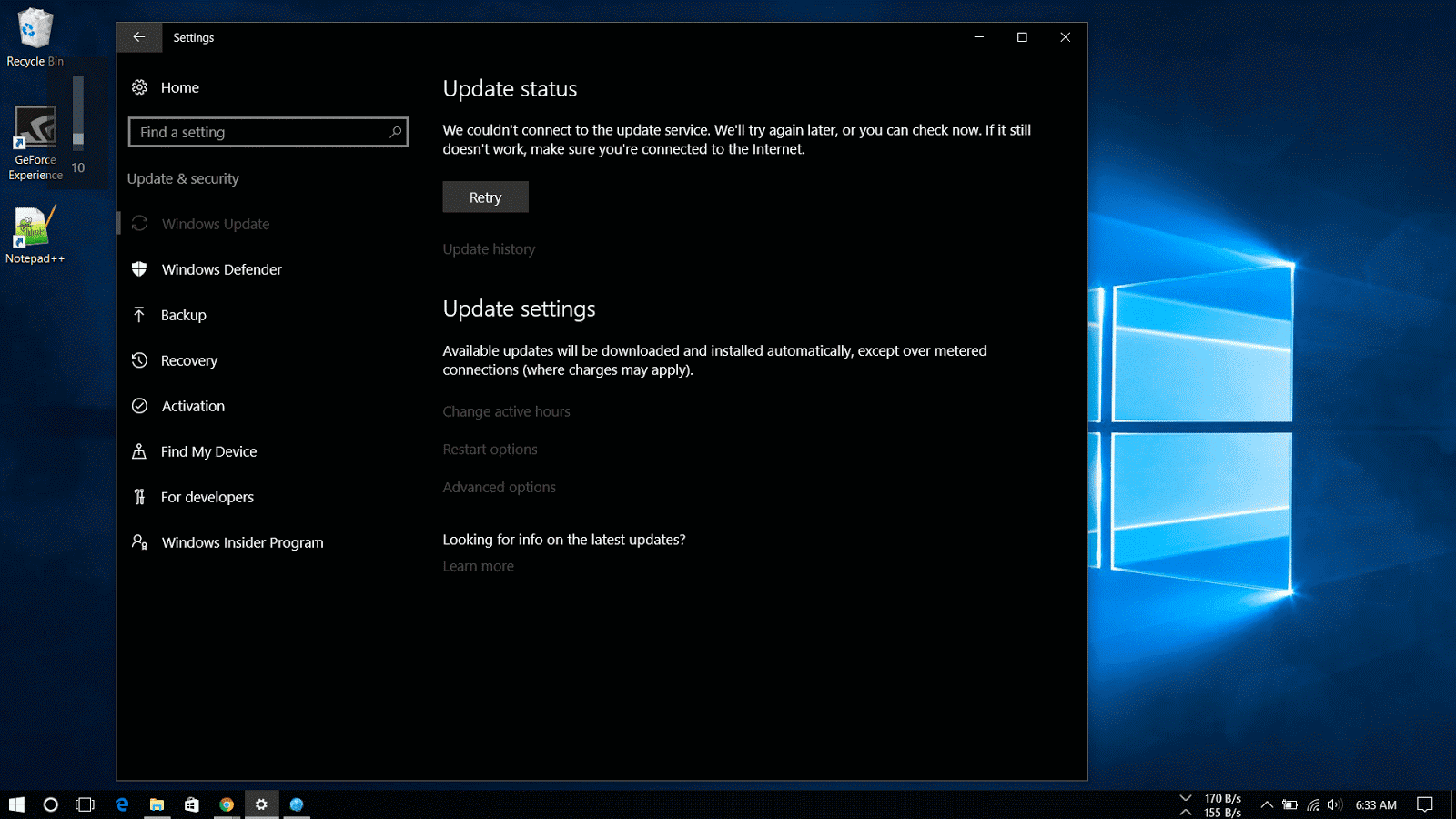
Cannot install Windows 10 update

When a new windows update doesn’t show up or whether you have a limited internet connection or you prefer to take the responsibility of taking care of your Windows machine and want to manually update..well you've come to the right place.

The article focuses on how to install Windows updates manually.

Microsoft makes available updates for Windows 10 on the regular basis to patch any system software error, to patch a security hole or to improve the functionality of the operating system.

These updates are rolled out to protect users from online phishing attacks, prevent loss of data from a system crash and to add new definitions and functionality improvements. Even now that updates are mandatory to keep the Windows devices up to date, sometimes updates may not appear for download on the computer for a long period of time for many reasons.

update windows manually

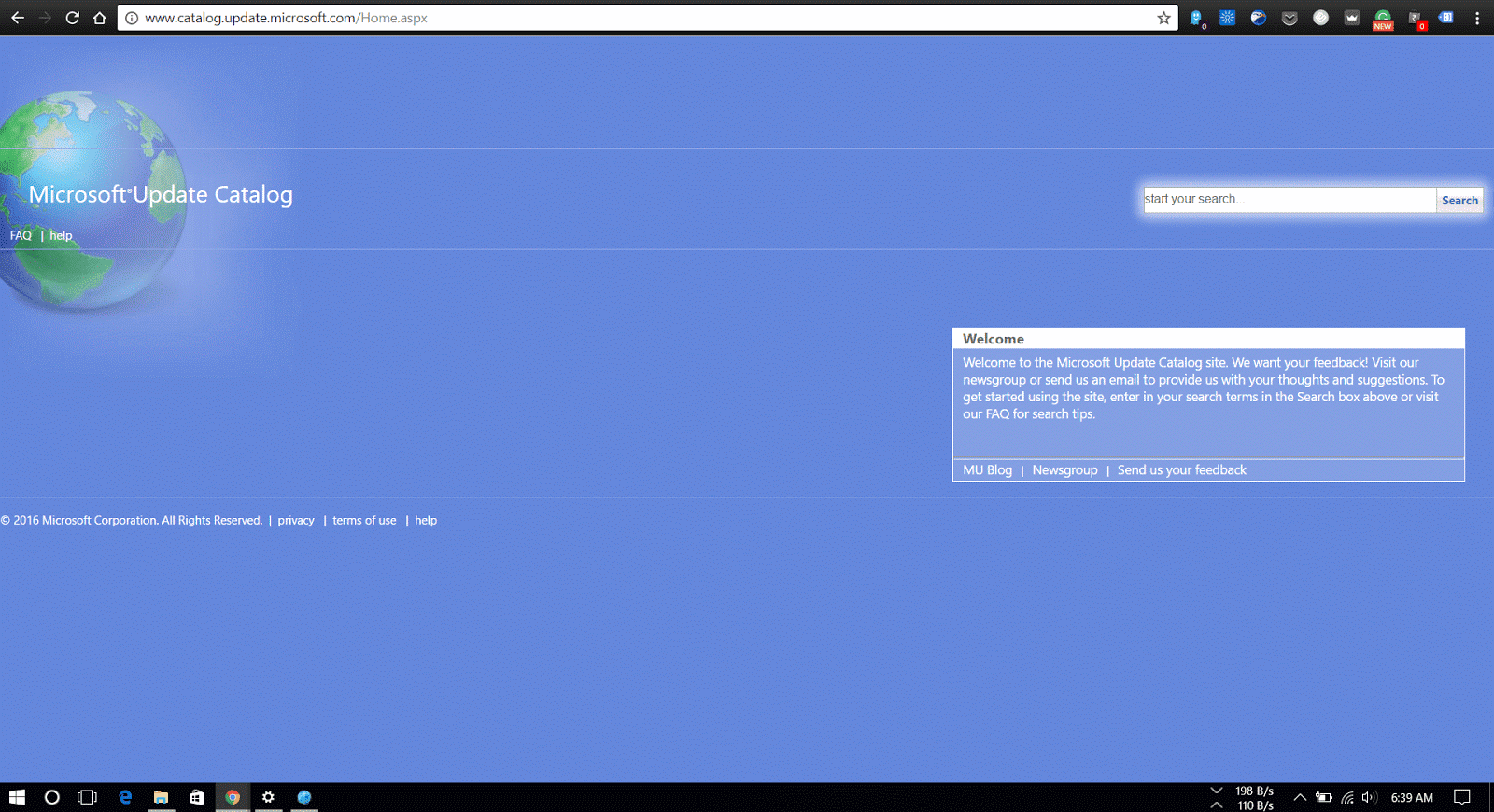
Windows Update is the preferred method to get updates from Microsoft, users can also manually download the updates as they are available through the “Microsoft Update Catalog” website.

This website mainly serves as a resource for IT administrators who need to test updates before pushing them to the devices in the network, you can use the Update Catalog website to quickly download a new update if it’s not showing for you in Windows Update as an alternative option.

How to download cumulative updates


Note that the Microsoft Catalog Website doesn’t list anything, instead it’s a search page where the user must know exactly which page to download and on which type of system the update is to be installed.

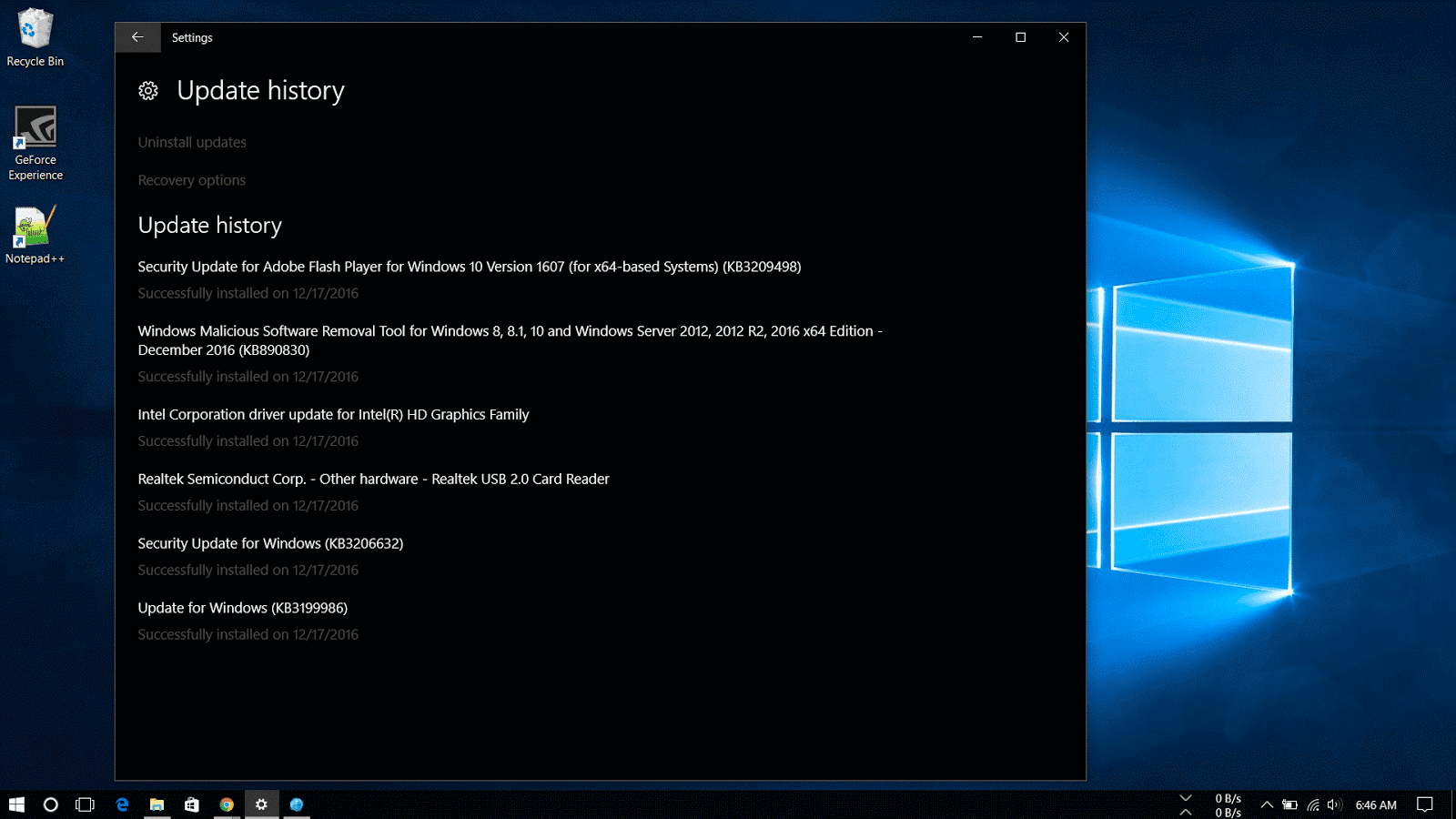
What is KB number

The easiest way to find an update is to know it’s Knowledge Base reference number. (The KBxxxxxx number which you might see when you’re installing updates in the Windows Update). For example, on December 13th, Microsoft released Windows 10 build 14393.576, which Knowledge Base reference was KB3206632. You can find references on the Windows 10 Update History Website.

Then do the following steps:

1. Visit the Microsoft Update Catalog website

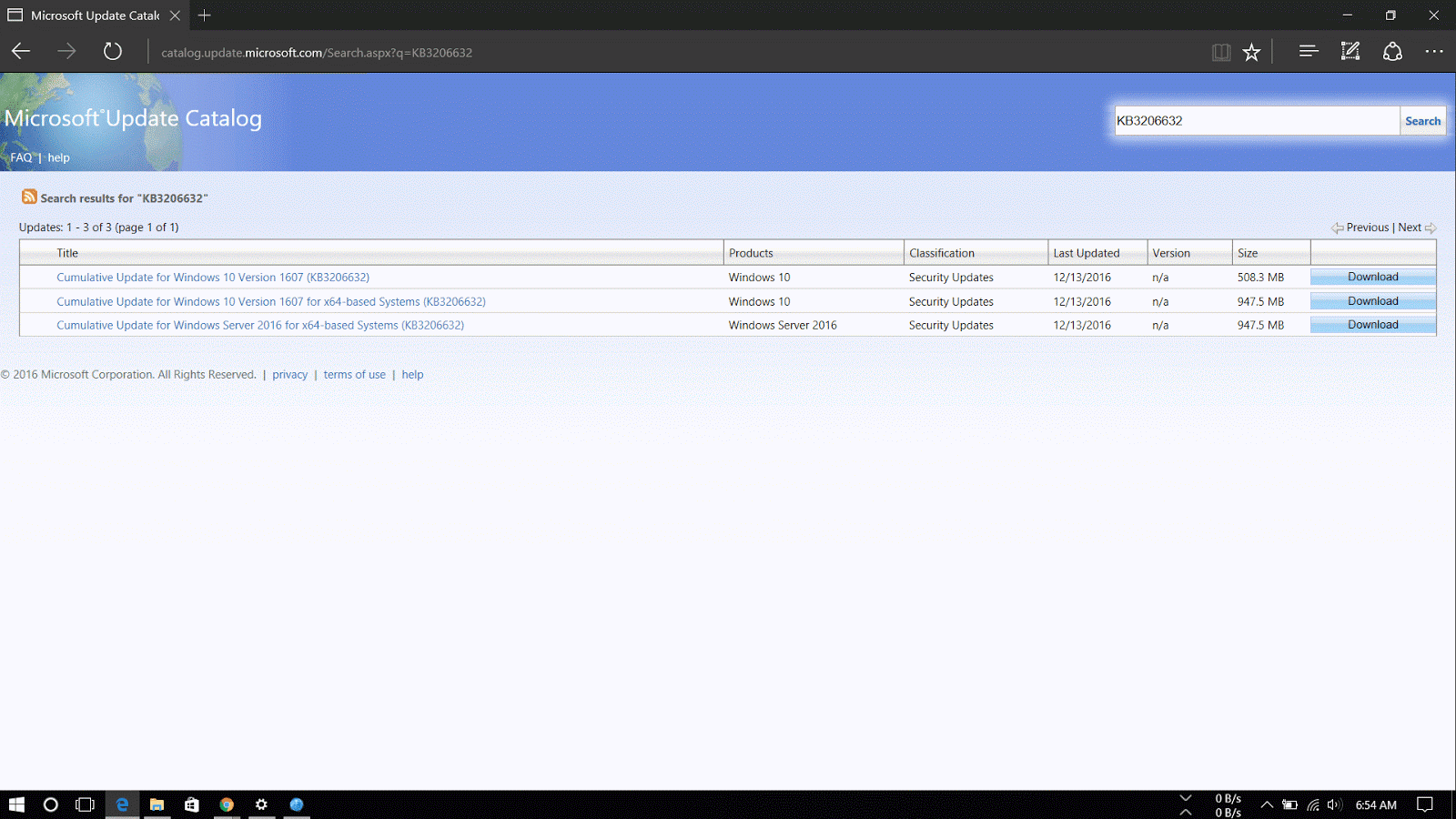
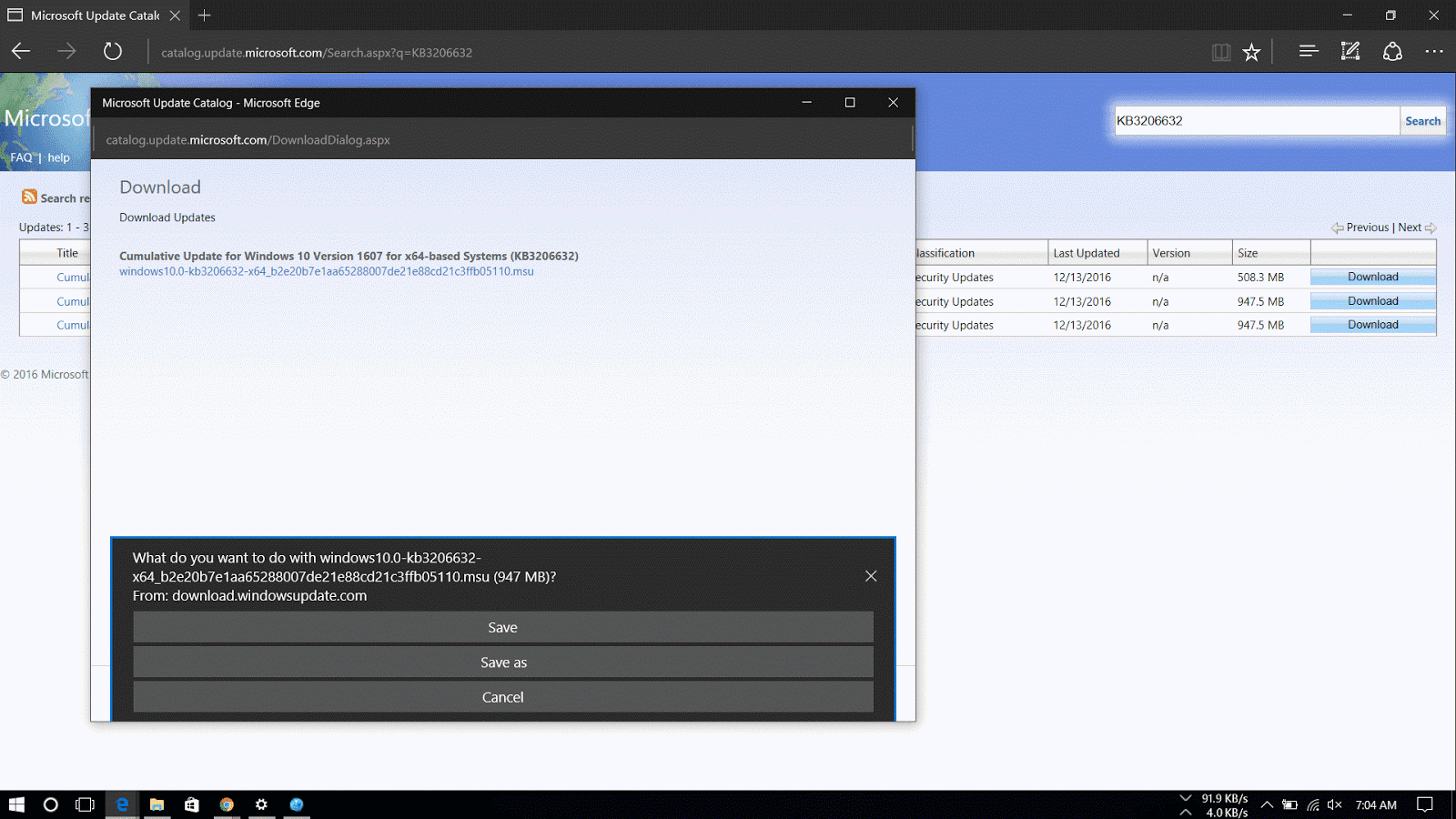
2. Do a search for the update using the KB number for the update you want. For example, KB3206632.                    

kb number

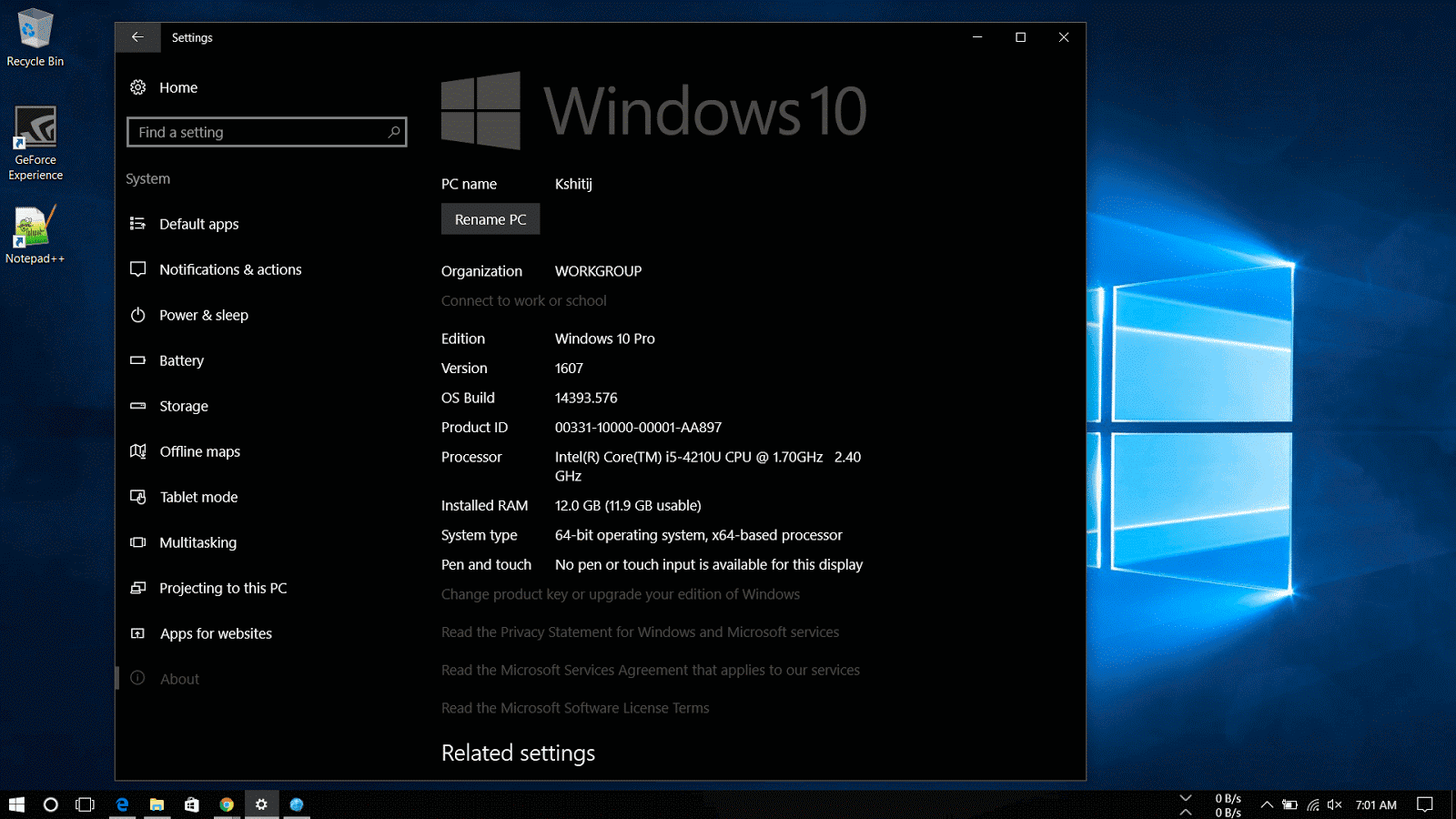
3. Now download the 32-bit or 64-bit version of the update. If you are unaware of the system type, go through the following steps:

       1. Open Settings.

      2.Click on System.

      3.Click on About.

       4.See the System type.

32-bit or 64-bit windows 10

4. A new window will appear with a direct download link, click on it to download the .msu file.

Manually download windows 10 updates

Now that you've downloaded the file, for steps on how to install the updates manually read my article here.
Read More
Posted in How To, Windows | No comments

Monday, 19 December 2016

How To Install Cumulative Updates of Windows 10 Manually

Posted on December 19, 2016 by anuj
If you have downloaded the Microsoft Update Manually, follow the steps below to install or follow this guide on how to download the updates manually.

You can simply double-click the update .msu file to install an update on Windows 10 and restart to finish update or you may prefer to manually include options such as not to restart after installing the update, which can be done by using the command prompt.

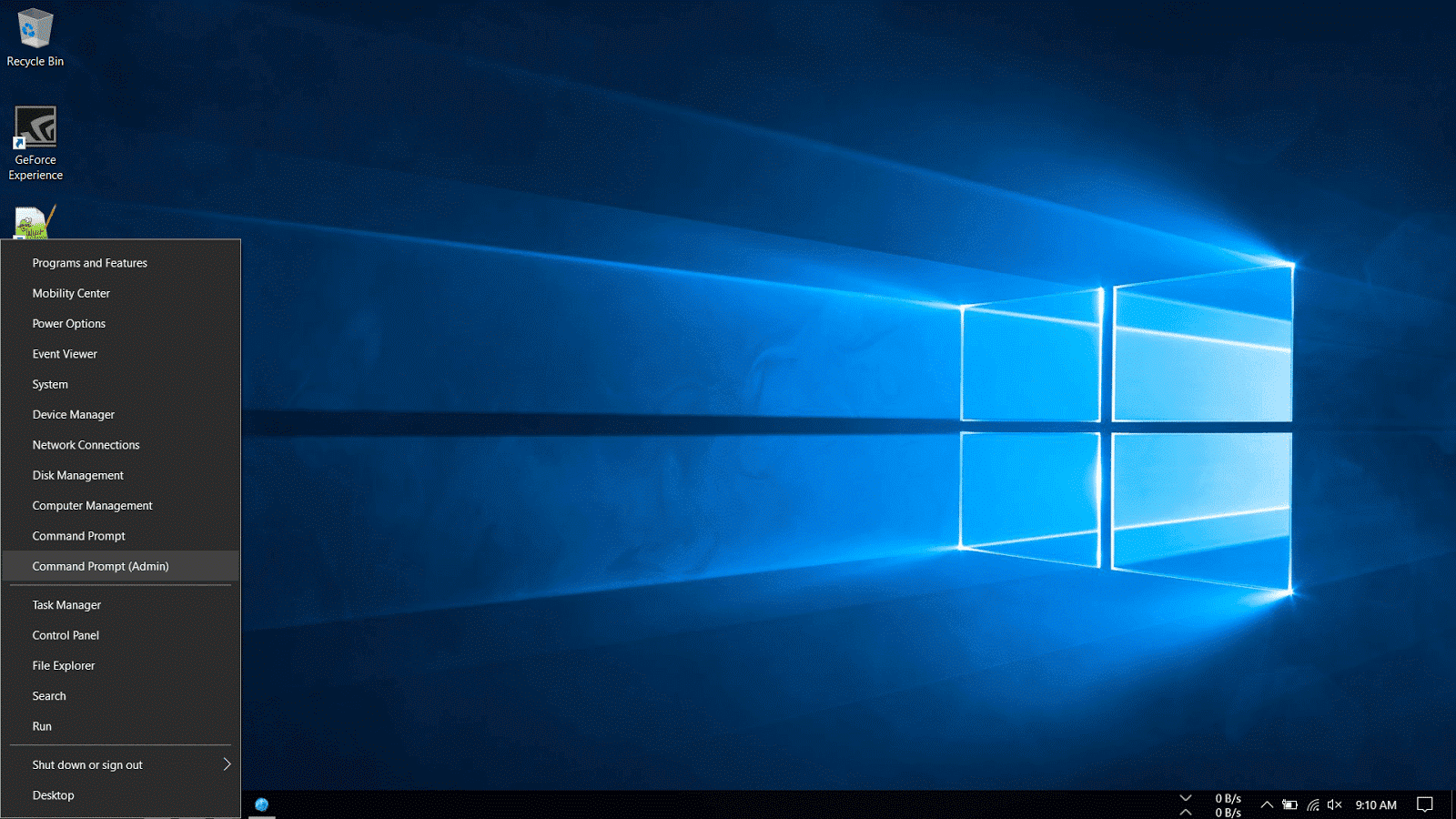
1. Right-Click on the Windows icon on the bottom-left corner of the taskbar and select Command Prompt (Admin).

Install updates on Windows 10

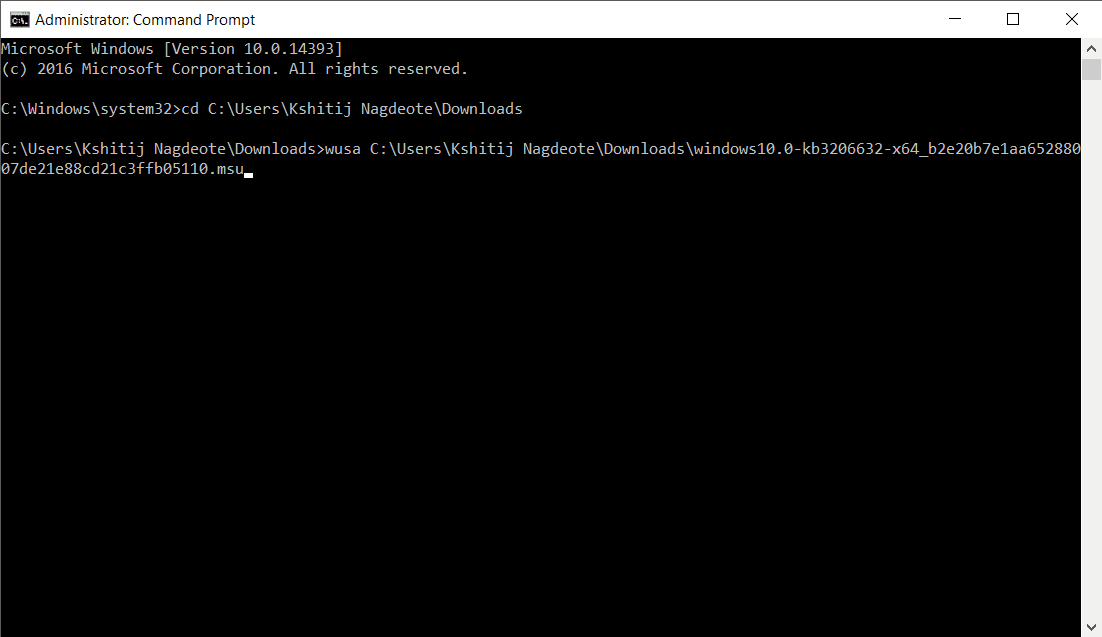
2. Navigate to the folder where the update is downloaded. In my machine, it is located in the Downloads folder.

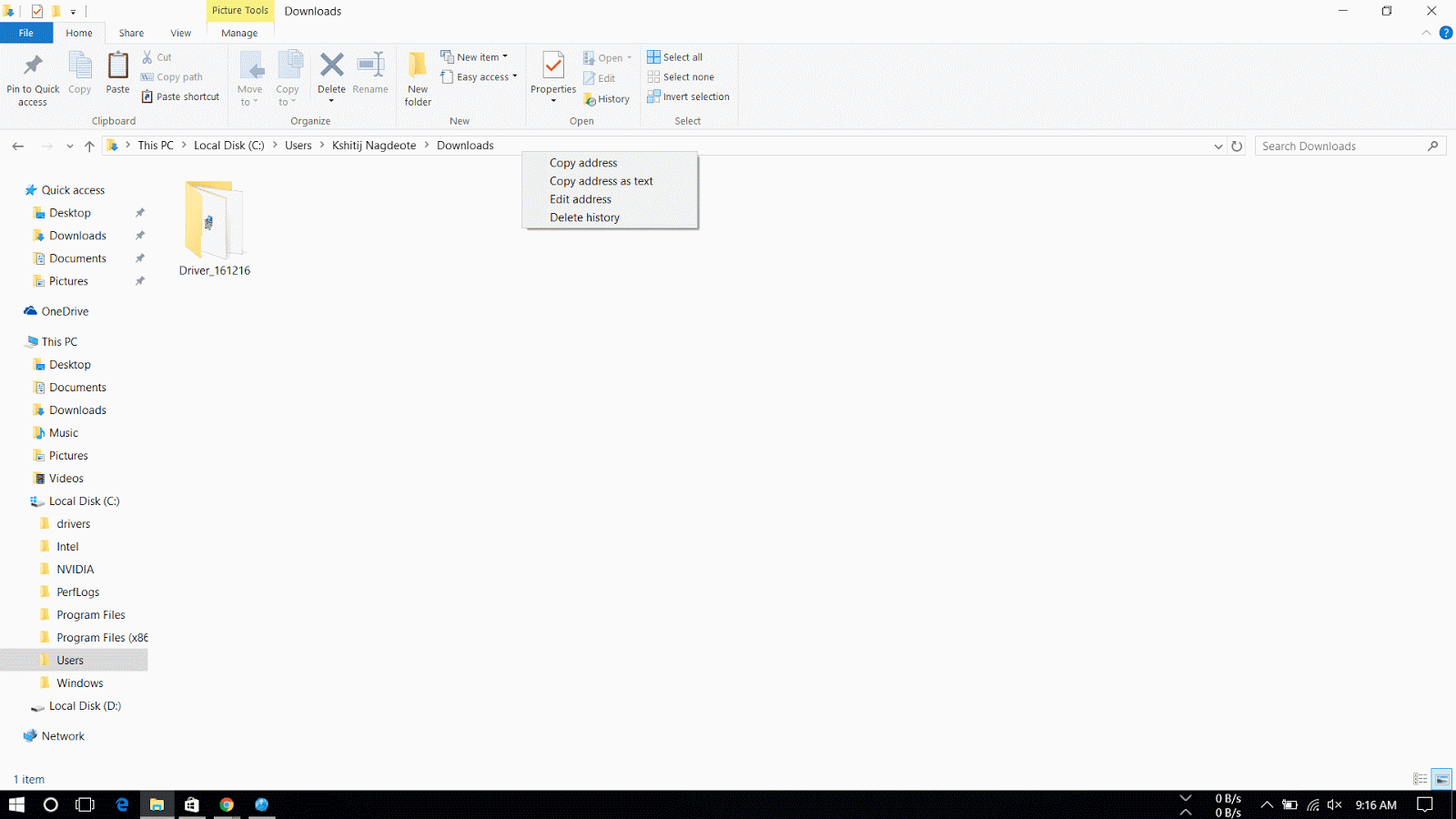
3. Then go to C: drive > Users > USER NAME > Downloads. Right-Click on the address bar and select copy address.  Then in Command Prompt type cd and right-click to automatically copy the address and hit Enter.

copy address of folder in windows 10

4. Type the following command and press enter.

wusa C:\PATH-OF-DOWNLOADED-UPDATE\NAME-OF-UPDATE.msu /quiet /norestart
manual update windows using command prompt

 Note: We're adding the /quiet /norestart switches to prevent the operating system from restarting the computer after installing the update. But later you have to manually install the update to finish applying it.

Quick Tip: If the name of the update turns to be very long, simply begin typing "Windows10.0-kb" and hit the Tab key to autocomplete the name.

The Microsoft Update Catalog website works best using the Internet Explorer, but recent changes remove the ActiveX requirement allowing users to access the site using Chrome and Microsoft Edge. Along with the cumulative updates, you can download the latest updates for Device Drivers and Surface updates.

Please do note that sometimes updates won't get through because of a problem in the computer or if the update is incompatible with the system.

The steps shown in this guide applies to download and install updates on previous versions of operating system, including  Windows 8.1 and Windows 7.
Read More
Posted in How To, Windows | No comments
Older Posts Home
Subscribe to: Posts (Atom)

Popular Posts

  • Top 10 Android Launchers You Need To Try in 2017
    Are you bored of same old Home Screen and User Interface on your mobile device? Want to look cool and be functionable and at the same time ?...
  • What is Hosting
    To start a website,registering a Domain name and opting a Hosting service is Important as they will give you space and unique domain name (w...
  • Why College Students Must Blog
    Blogging is getting great exposure all over the world.There are many blogs online that show the reality of money that they earn through blog...

Categories

  • Android
  • Blogging
  • Hosting
  • How To
  • Linux
  • News
  • Product reviews
  • Tech
  • Tips
  • What is
  • Windows

Blog Archive

  • February 2017 (3)
  • January 2017 (2)
  • December 2016 (5)
  • October 2016 (2)
  • September 2016 (1)
  • August 2016 (1)
  • February 2016 (4)
  • January 2016 (4)
Powered by Blogger.

Report Abuse

  • Home

About Me

anuj
View my complete profile

Search This Blog