insynout

  • Subscribe to our RSS feed.
  • Twitter
  • StumbleUpon
  • Reddit
  • Facebook
  • Digg

Saturday, 31 December 2016

How to Manually Download and Install Windows 10 Updates

Posted on December 31, 2016 by anuj

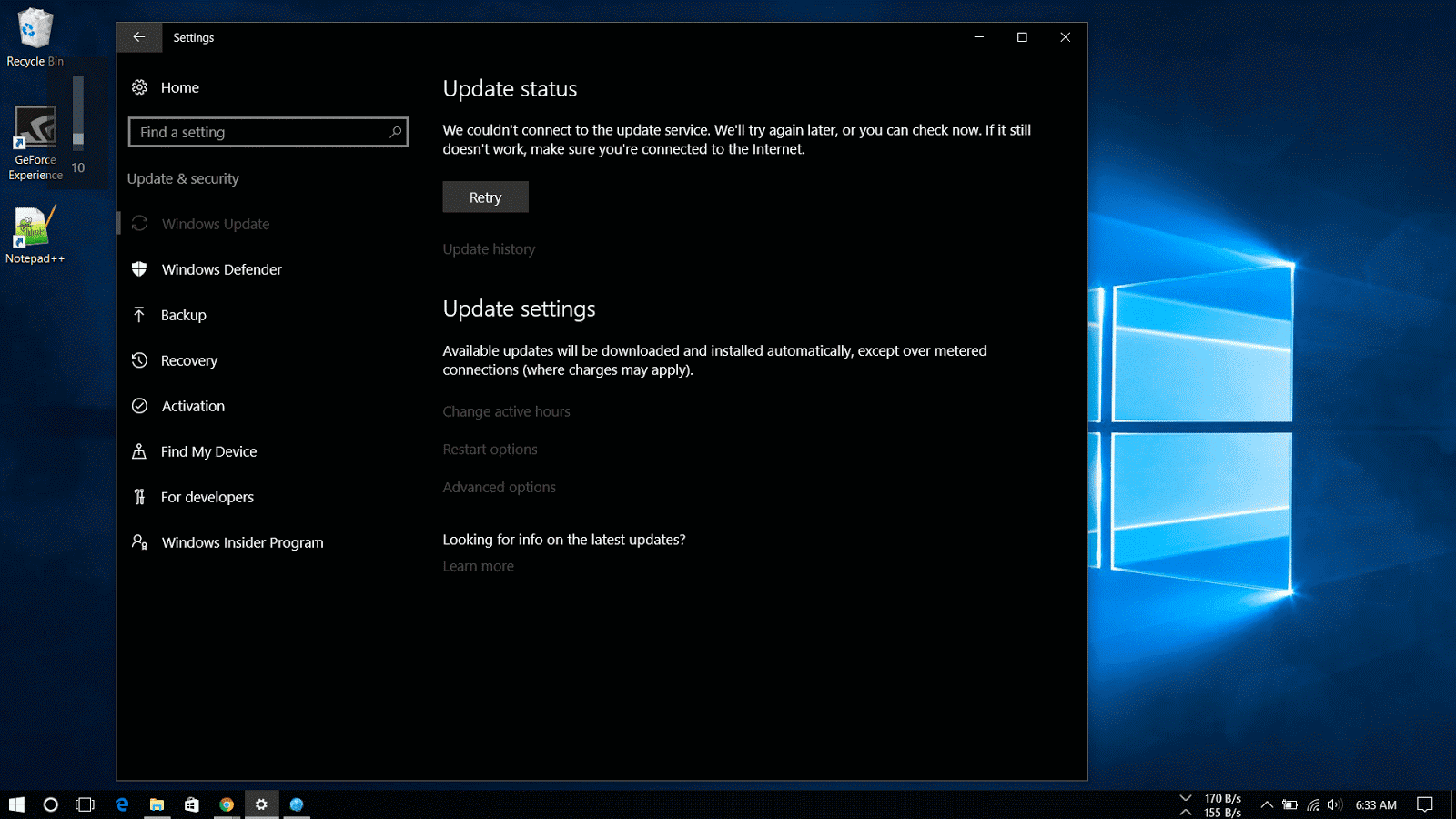
Cannot install Windows 10 update

When a new windows update doesn’t show up or whether you have a limited internet connection or you prefer to take the responsibility of taking care of your Windows machine and want to manually update..well you've come to the right place.

The article focuses on how to install Windows updates manually.

Microsoft makes available updates for Windows 10 on the regular basis to patch any system software error, to patch a security hole or to improve the functionality of the operating system.

These updates are rolled out to protect users from online phishing attacks, prevent loss of data from a system crash and to add new definitions and functionality improvements. Even now that updates are mandatory to keep the Windows devices up to date, sometimes updates may not appear for download on the computer for a long period of time for many reasons.
update windows manually

Windows Update is the preferred method to get updates from Microsoft, users can also manually download the updates as they are available through the “Microsoft Update Catalog” website.

This website mainly serves as a resource for IT administrators who need to test updates before pushing them to the devices in the network, you can use the Update Catalog website to quickly download a new update if it’s not showing for you in Windows Update as an alternative option.

How to download cumulative updates


Note that the Microsoft Catalog Website doesn’t list anything, instead it’s a search page where the user must know exactly which page to download and on which type of system the update is to be installed.
What is KB number

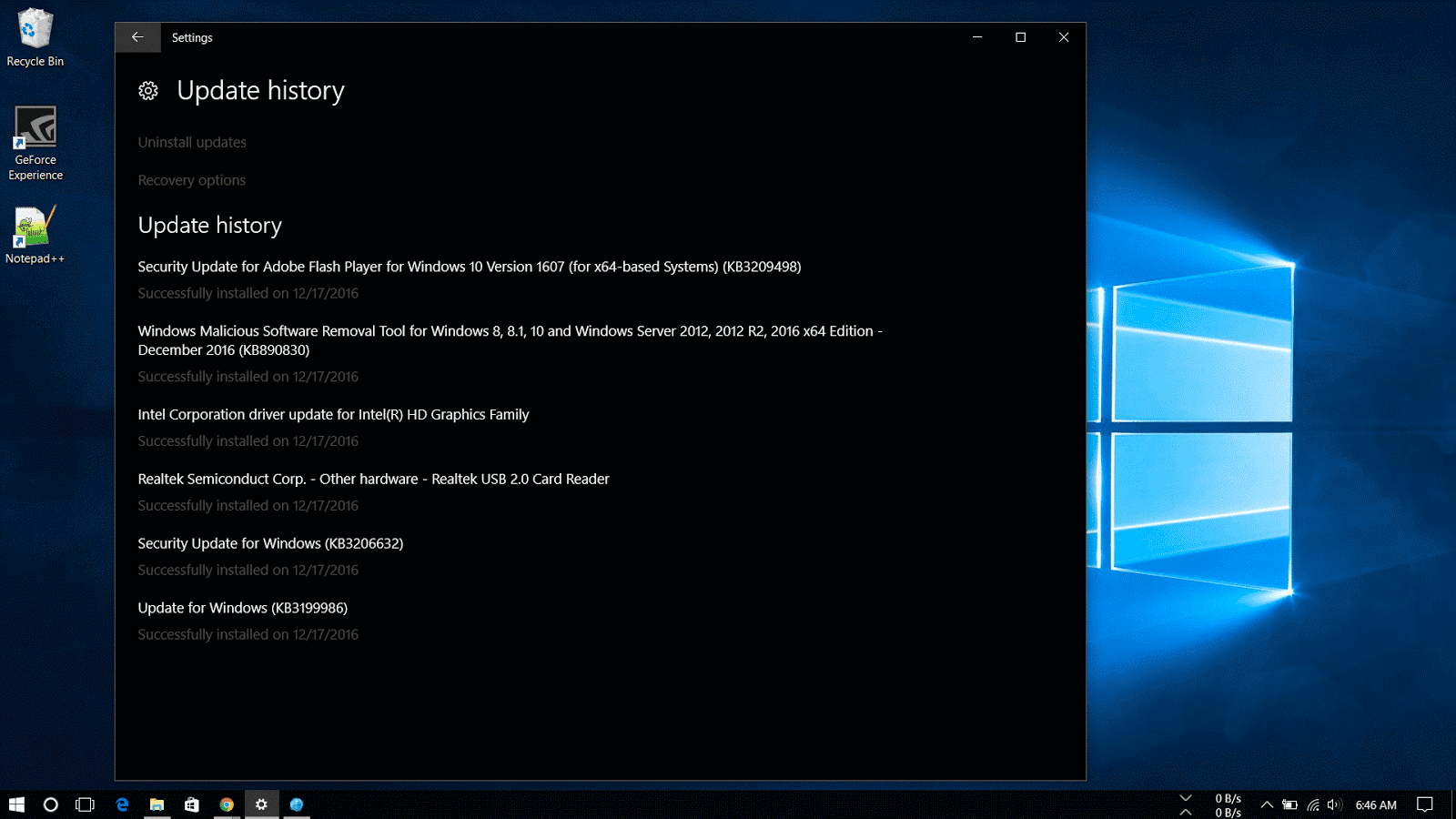
The easiest way to find an update is to know it’s Knowledge Base reference number. (The KBxxxxxx number which you might see when you’re installing updates in the Windows Update). For example, on December 13th, Microsoft released Windows 10 build 14393.576, which Knowledge Base reference was KB3206632. You can find references on the Windows 10 Update History Website.

Then do the following steps:

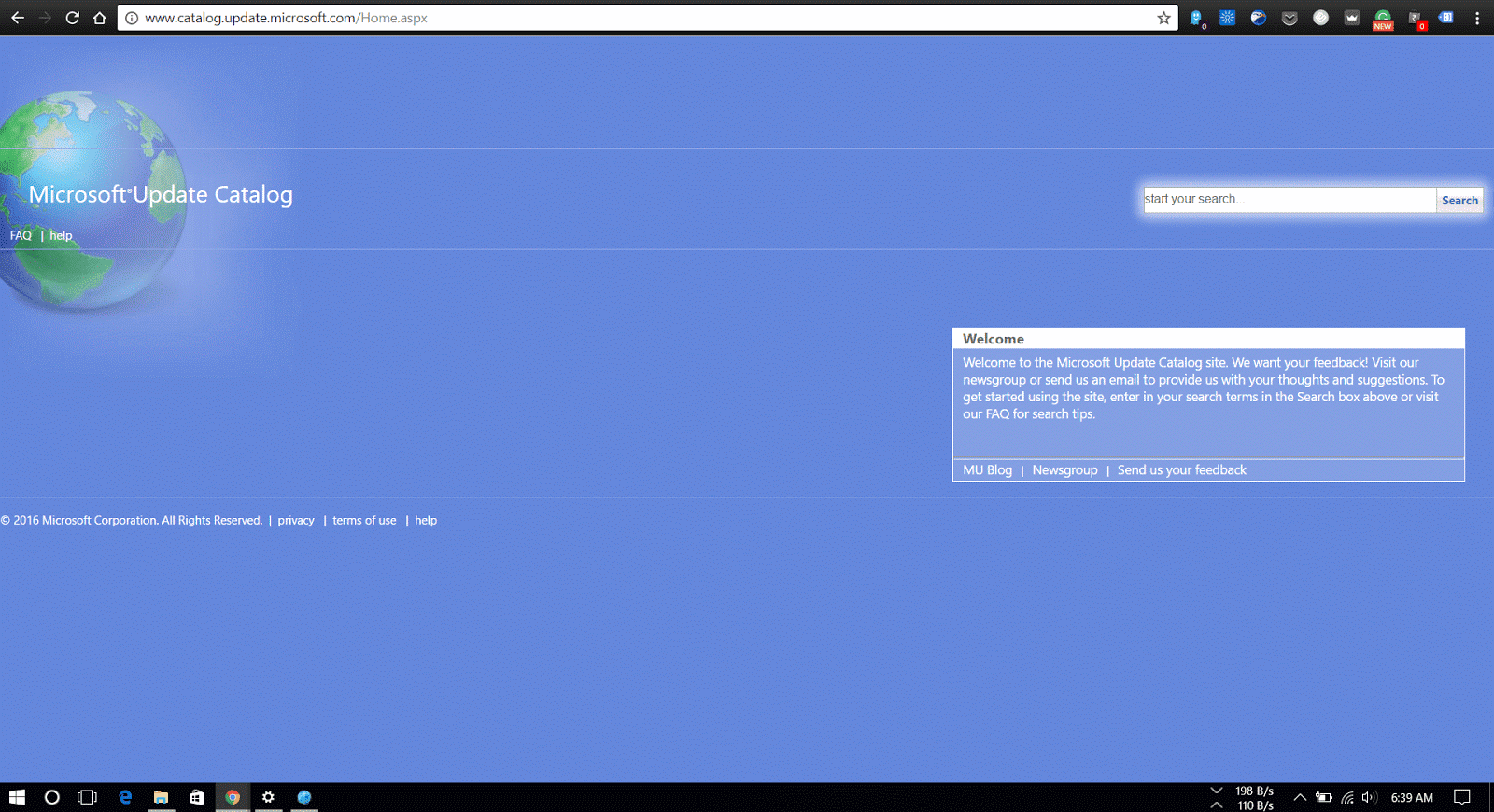
1. Visit the Microsoft Update Catalog website

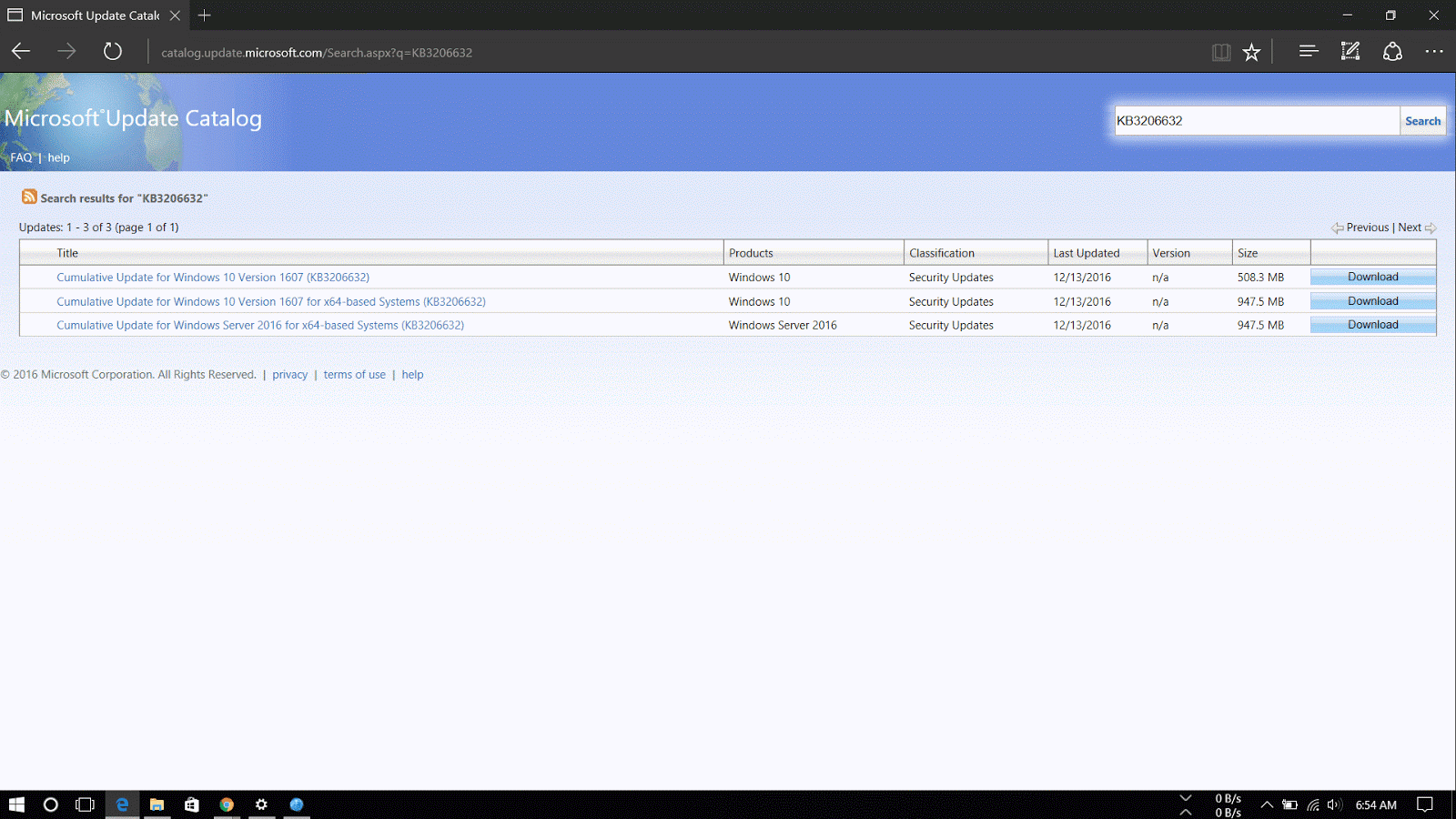
2. Do a search for the update using the KB number for the update you want. For example, KB3206632.                    
kb number

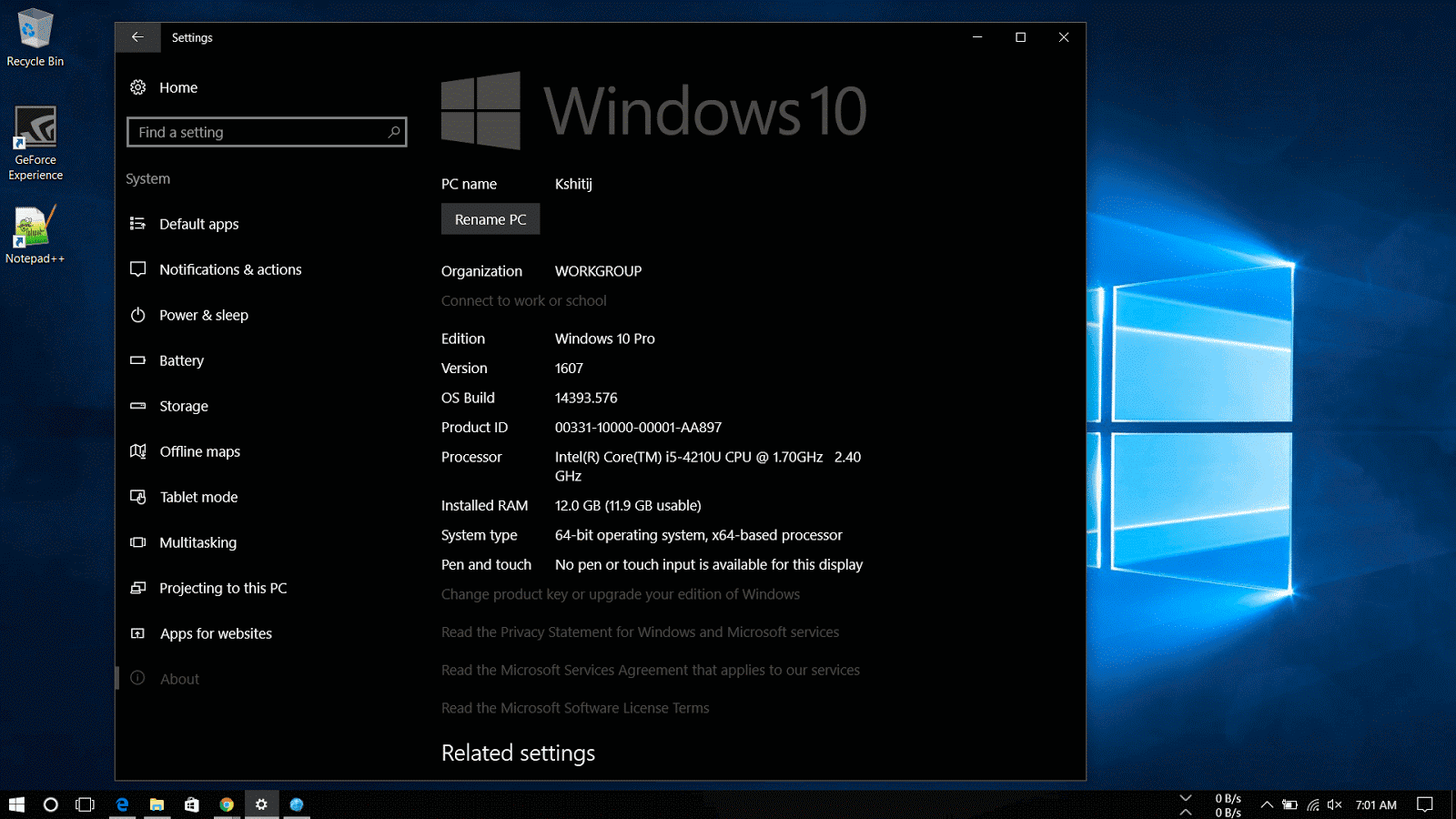
3. Now download the 32-bit or 64-bit version of the update. If you are unaware of the system type, go through the following steps:

       1. Open Settings.

      2.Click on System.

      3.Click on About.

       4.See the System type.
32-bit or 64-bit windows 10

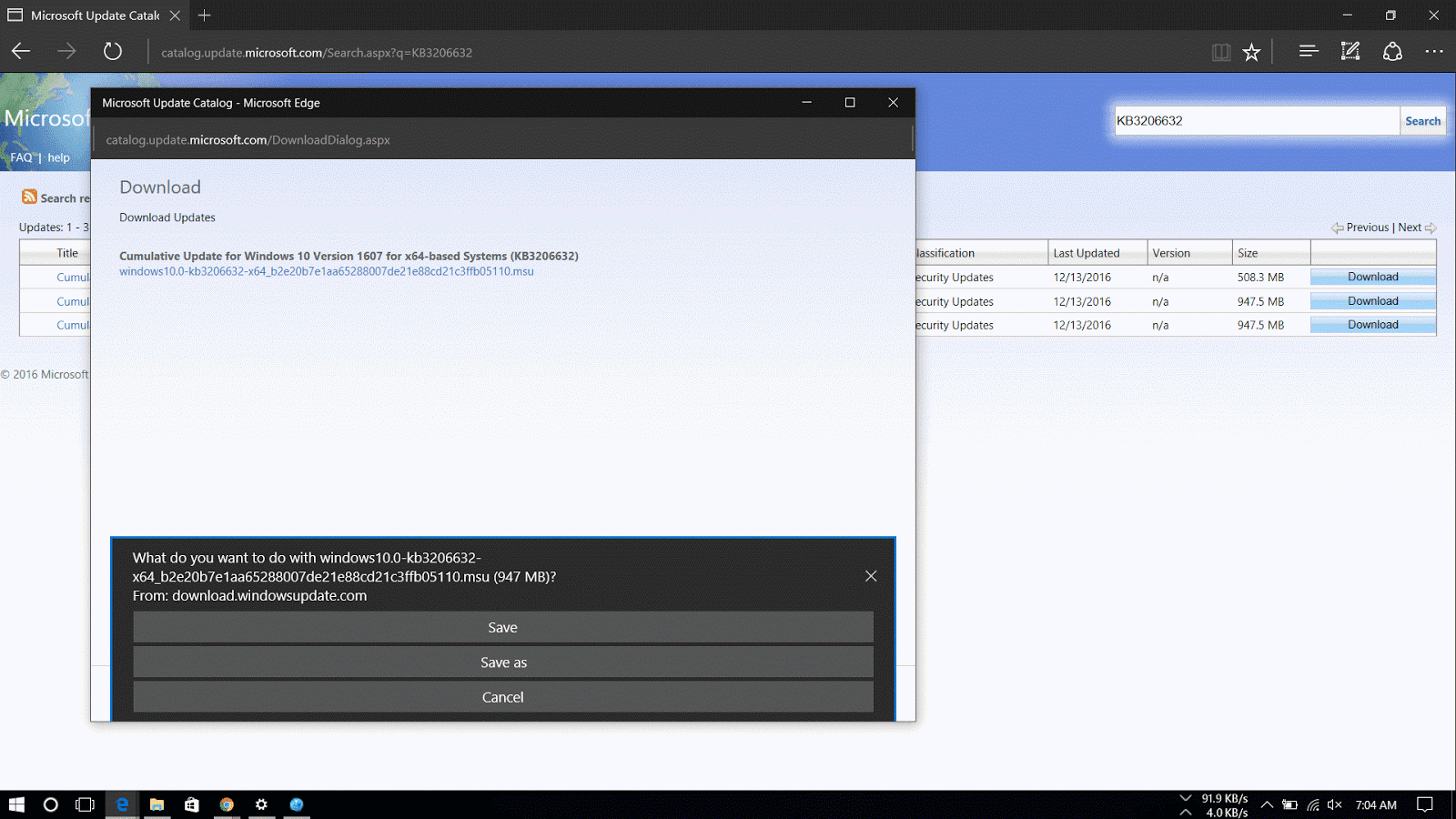
4. A new window will appear with a direct download link, click on it to download the .msu file.
Manually download windows 10 updates

Now that you've downloaded the file, for steps on how to install the updates manually read my article here.
Read More
Posted in How To, Windows | No comments

Monday, 19 December 2016

How To Install Cumulative Updates of Windows 10 Manually

Posted on December 19, 2016 by anuj
If you have downloaded the Microsoft Update Manually, follow the steps below to install or follow this guide on how to download the updates manually.

You can simply double-click the update .msu file to install an update on Windows 10 and restart to finish update or you may prefer to manually include options such as not to restart after installing the update, which can be done by using the command prompt.

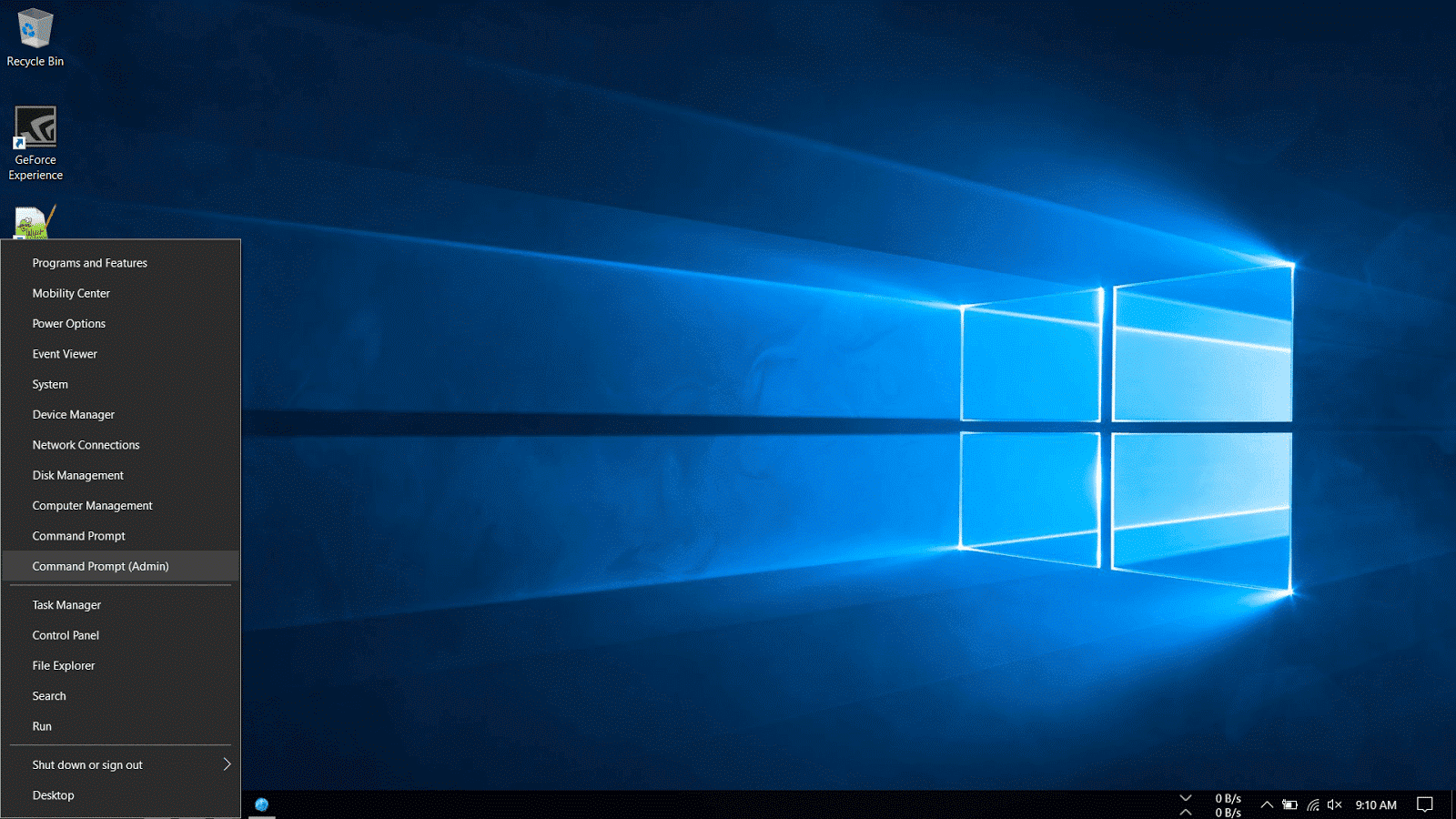
1. Right-Click on the Windows icon on the bottom-left corner of the taskbar and select Command Prompt (Admin).

Install updates on Windows 10

2. Navigate to the folder where the update is downloaded. In my machine, it is located in the Downloads folder.

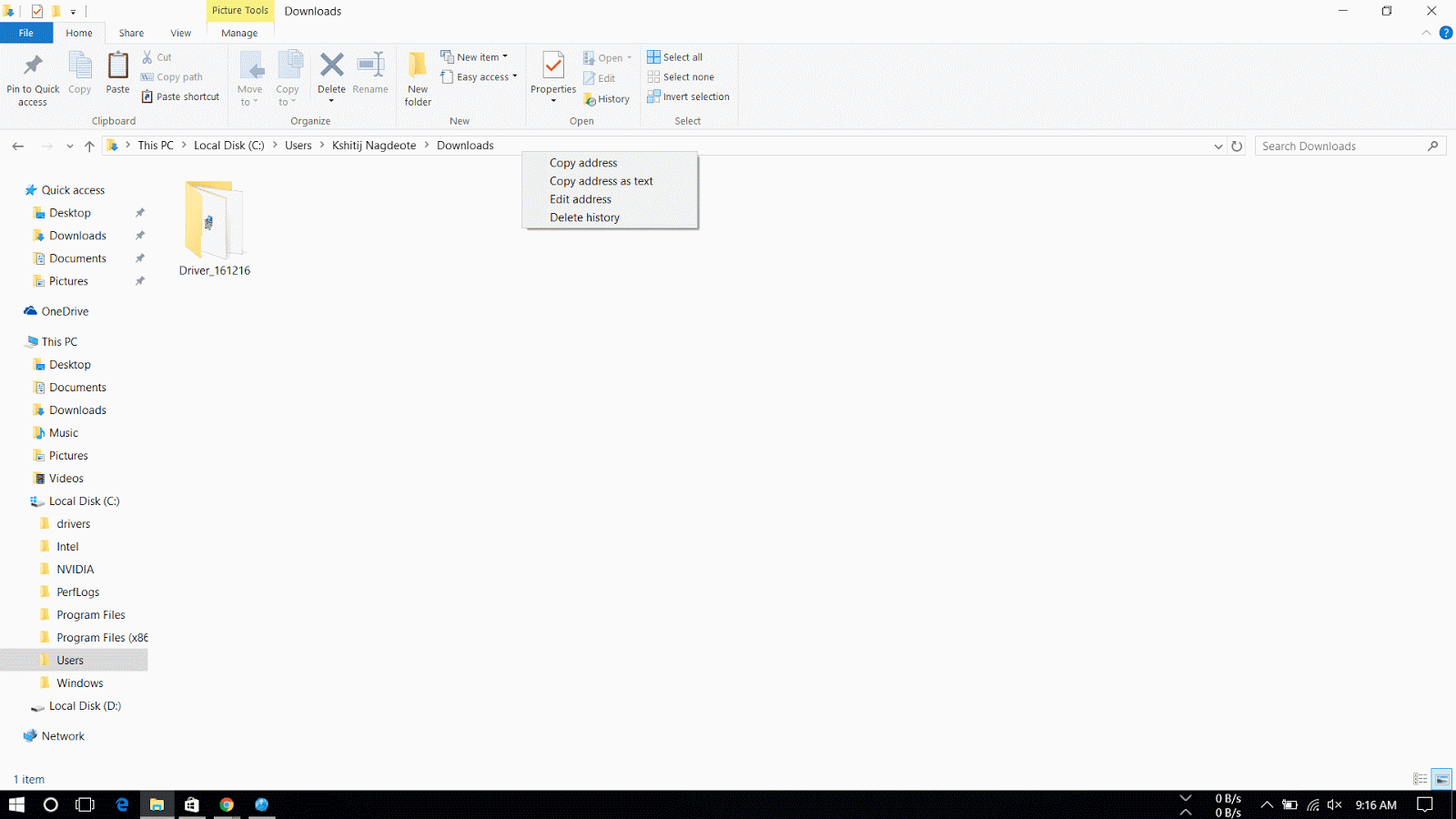
3. Then go to C: drive > Users > USER NAME > Downloads. Right-Click on the address bar and select copy address.  Then in Command Prompt type cd and right-click to automatically copy the address and hit Enter.

copy address of folder in windows 10

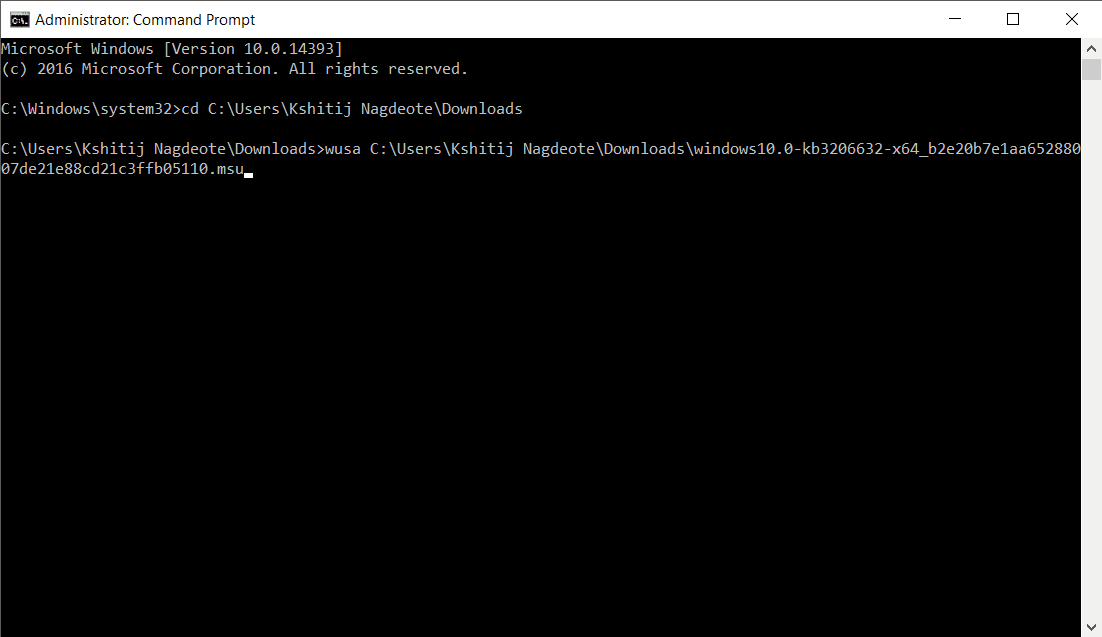
4. Type the following command and press enter.

wusa C:\PATH-OF-DOWNLOADED-UPDATE\NAME-OF-UPDATE.msu /quiet /norestart
manual update windows using command prompt

 Note: We're adding the /quiet /norestart switches to prevent the operating system from restarting the computer after installing the update. But later you have to manually install the update to finish applying it.

Quick Tip: If the name of the update turns to be very long, simply begin typing "Windows10.0-kb" and hit the Tab key to autocomplete the name.

The Microsoft Update Catalog website works best using the Internet Explorer, but recent changes remove the ActiveX requirement allowing users to access the site using Chrome and Microsoft Edge. Along with the cumulative updates, you can download the latest updates for Device Drivers and Surface updates.

Please do note that sometimes updates won't get through because of a problem in the computer or if the update is incompatible with the system.

The steps shown in this guide applies to download and install updates on previous versions of operating system, including  Windows 8.1 and Windows 7.
Read More
Posted in How To, Windows | No comments

Saturday, 17 December 2016

How to Vanish from the Internet completely

Posted on December 17, 2016 by anuj
Delete from internet completely

Social Media has made everyone's life an open book on the Internet. (In some cases a bit too far open) In today's digital age, Internet companies and markets are constantly tracking users data for relative targeting and data mining. As more and more individuals and businesses rely on the Internet as the primary source of information about others, compromising the data of the other person grows.

Social Media Suicide

People who are concerned about their personal information online, potentially costing them jobs and other problems or for someone who wants to delete every information about self on the internet or for someone who is facing the harsh realities of social media fallout, the decision of pulling the plug might seem an attractive idea. And while it might seem difficult to maintain a distance between personal and private life in the 24x7 world, truth is that you can disappear online entirely by little effort and dedication. Also, you can entirely create a new identity for yourself.

The first step to keeping a low profile is to wipe out Social media existence. To delete your accounts just head on to websites such as JustDelete.me and Deseat.me. These websites help to clean out your existence from the internet.

deseat me interface

How does it work?  Well, for instance, Deseat.me asks permissions to your Gmail account, then it finds accounts connected to the email id ever created and provides a detailed list to deactivate the accounts.

delete from facebook, twitter


Using the tools, either you can create an entirely new identity for yourself or totally vanish from the online social world.

just delete me

If you totally want to delete every trace of yours from the Internet, follow this guide by ProphetHacker, which contains nine steps to wipe out your existence from the Internet.

Hope You like the article please subscribe or follow on social media to receive updates.
Read More
Posted in Tips | No comments

Thursday, 8 December 2016

WhatsApp Update : List of Smartphones that will not be supported in 2017

Posted on December 08, 2016 by anuj
WhatsApp Messenger

As we all know, WhatsApp is a popular messenger for smartphones. It runs on many platforms such as Android, Blackberry OS, Symbian and iOS to name a few.
But earlier this year, WhatsApp announced the discontinuation of its services for older smartphones by the end of 2016.

In a technology upgrade, WhatsApp announced that it will discontinue the development of older smartphones and focus on the platforms that people use widely.

“While these mobile devices have been an important part of our story, they do not offer the kind of capabilities we need to expand our app’s features in the future,” said a WhatsApp spokesperson.

The mobile platforms and their versions which would not be supported by WhatsApp in 2017 are :
  
– Android : Android 2.1 and Android 2.2
– Windows : Windows Phone 7
– iPhone: 3GS/ iOS 6

whatsapp messenger


However, app support will be extended for the following devices until June 2017 :

-Blackberry 10 running BBOS
-Nokia S40 running on Symbian S40
-Nokia Devices running on Symbian S60

A majority of the Android devices are supported. But iPhones running on iOS 6 and earlier will not be able to use the services of the app anymore.
Read More
Posted in News | No comments

Wednesday, 7 December 2016

SKEYE Nano 2 is the world’s smallest drone which fits in your hand

Posted on December 07, 2016 by anuj
Skeye Nano

Drones and Internet Of Things ( IOT ) are two sectors of technology which are taking off with much new technology and addition of products in the Industry. Drones are nowadays used in pretty much everything from delivering pizzas,video shooting,military surveillance to taking selfies. These unmanned aerial vehicles are taking the world by storm. Drones vary in shapes,sizes,dimensions and features.

Now there are drones which are larger in size and have best features and there are also drones which claim to be the smallest. Among the titles of the smallest drone, have you come across one which has a camera and packs a punch ?

Nano Drones

SKEYE drones, from TRNDlabs, are the current holders of making the world’s smallest drone series ( SKEYE Nano ), have added another great product to their line. SKEYE Nano 2 is arguably the world’s smallest flying camera drone at just 1.6 inches wide.

Measuring just 1.6 inches (4 centimeters) on sides and 0.9 inches in height, the 17-gram (0.59 ounce) awesome drone is capable of doing acrobatic stunts, has a Live Wi-Fi connectivity,SD Camera, LED lights for night flying and comes with Throw to fly and Ready to fly technology.
Drone Joystick

SKEYE Nano 2 is so easy and fun to operate that any person without any experience, can handle it. The controller has adjustable gyro sensitivity and can be set to beginner, mid-level, and expert for the ultimate precision control.It also has 6-axle flight control system.The Drone sits in the compact casing in the joystick.

Phone joystick holder

SKEYE Nano 2 FPV Is equipped with Wi-Fi So that it can be alternatively controlled via the App on Android and iOS. Pairing with the onboard camera, the app gives a First Person View (FPV) of exactly what the drone sees. It’s not just a drone, It’s a portable flying camera !

Drone Selfie

The Drone is easy to use, Ultra- Compact and the app give you a whole lot of functionality,features and full control over the device. It’s a great product, a best buy, and ships anywhere in the world for free. The drone’s cost starts from 2,500 INR (~37 USD). You can buy one here and the Nano 2 here


Read More
Posted in News | No comments

Monday, 3 October 2016

YouTube Go : Watch YouTube Videos Without Using Internet

Posted on October 03, 2016 by anuj
http://youtubego.com/signup/

In Brief : Google has launched a new app called YouTube Go on which lets users watch videos without using the internet. Made specifically for slow network connections, users can preview, select desired video resolution and choose on which storage media to download. YouTube Go was designed with insights from India in order to bring the power of video to mobile users,keeping data and connectivity in mind.     

About 4 days ago YouTube launched its new app,another version of YouTube called "YouTube Go" in India for slow network connections.The project is part of company’s ‘Next Billion’ program through which it aims to connect India’s next billion people to the internet.

YouTube Go app enables users to save the videos offline and watch them later on the go.The application is still in its beta phase and testing is carried out with hundred of users in 15 cities across India. It's coded and designed straight from the scratch to work with little-to-no connectivity,use fewer data and suggest recommendations and social experiences.

  Find And Control Data

  Save and Share Without Internet

“YouTube Go is a brand new app to help the next generation of users share and enjoy videos,” YouTube product management VP Johanna Wright says in a statement. “YouTube Go was designed and built from the ground up with insights from India, in order to bring the power of video to mobile users in a way that is more conscious of their data and connectivity, while still being locally relevant and social.”

YouTube Go features video previews in form of slideshows for each clip. The user can choose either to stream  or save video offline. It also provides the video file size depending on the quality of the video chosen and also displays the memory left on your device. The saved files can be stored on phones' local memory or on an SD card.


The interesting features about YouTube Go :

  • Find and discover Related videos right on the home screen : Like the common YouTube app, YouTube Go home screen features trending and popular videos in your area,so the user will watch new videos that a particular state or community cares about.
  • Preview Videos before you save or watch : When a user taps on the video thumbnail, it triggers a small preview of the video or displays a slideshow of the entire video that you want to save.
  • Displays Resolution and Video information :  Users can choose the quality, resolution, and file size of the video which they want to watch later.
  • Share videos easily : Share Videos with friends and family nearby without using any data at all.Send and receive videos instantly and offline with others using the YouTube Go app.

YouTube will be released to more users in coming months before it's wide release in 2017.You can sign up on Youtube Go page as soon as it's available near you.

Did you find the article useful? Comment down your thoughts.
Read More
Posted in News | No comments

Nobody Will Be Able To Buy A New Windows 7 and Windows 8.1 PCs After This Month

Posted on October 03, 2016 by anuj
Windows 7 ,Windows 8.1

In Brief : Microsoft is ending the sales of PCs which come preinstalled with Windows 7 & and 8.1.This change will come into effect in November 2016. The security support for these files will be continued and Redmond will continue to provide security fixes for these versions.

Microsoft has been aggressively pushing Windows 10 by partnering with different OEMs,some customers still prefer buying new PCs powered by the older version of Windows. If you're planning to buy one,then hurry up!!
Microsoft has officially declared that Windows 7 and Windows 8.1 PCs won't be available in the market from November 2016. In simple words,these operating systems are officially expired for Microsoft.

Microsoft support page mentions that Windows 7 Professional whose sales have ended on October 31,2013,won't be sold separately or preinstalled on a PC.Same applies for Windows 8.1.This change will be implemented by Microsoft's royalty OEMs like Dell, Lenovo, Acer, and HP. They'll now only sell PCs powered by versions of Windows 10.

So,What about existing installations of Windows 7 And 8.1?


The older versions of Windows aren't dead completely. Microsoft will continue to roll out security updates via Windows Update. Windows 7 will receive updates until January 14,2020 and Windows 8.1 will be supported until January 2016.

Also, this new step is inspired by the fact that all the latest Processors from Intel and AMD will only support Windows 10.The signature edition on Windows 10 laptops provided by different OEMs are locked onto boot SSD so that there's no option of installing any other OS. The SSDs are code locked and are unlocked by the manufacturers only.These laptops are made to experience every tiny functionality of Windows 10 such as the Windows Hello for logging in using IR sensors in the laptops.


There is still an option to install Windows 7 and 8.1 on newer devices. But, be ready to move on to Windows 10 in future as Microsoft and OEMs will not provide a long-time support.

If you found this article helpful,Don't forget to drop your feedback in the comments section below.


Read More
Posted in News | No comments
Newer Posts Older Posts Home
Subscribe to: Posts (Atom)

Popular Posts

  • Top 10 Android Launchers You Need To Try in 2017
    Are you bored of same old Home Screen and User Interface on your mobile device? Want to look cool and be functionable and at the same time ?...
  • What is Hosting
    To start a website,registering a Domain name and opting a Hosting service is Important as they will give you space and unique domain name (w...
  • Why College Students Must Blog
    Blogging is getting great exposure all over the world.There are many blogs online that show the reality of money that they earn through blog...

Categories

  • Android
  • Blogging
  • Hosting
  • How To
  • Linux
  • News
  • Product reviews
  • Tech
  • Tips
  • What is
  • Windows

Blog Archive

  • February 2017 (3)
  • January 2017 (2)
  • December 2016 (5)
  • October 2016 (2)
  • September 2016 (1)
  • August 2016 (1)
  • February 2016 (4)
  • January 2016 (4)
Powered by Blogger.

Report Abuse

  • Home

About Me

anuj
View my complete profile

Search This Blog